Augustus Skipworth & SkipWire Laboratories proudly present
Your project folder,Thunk!…delivered instantly.
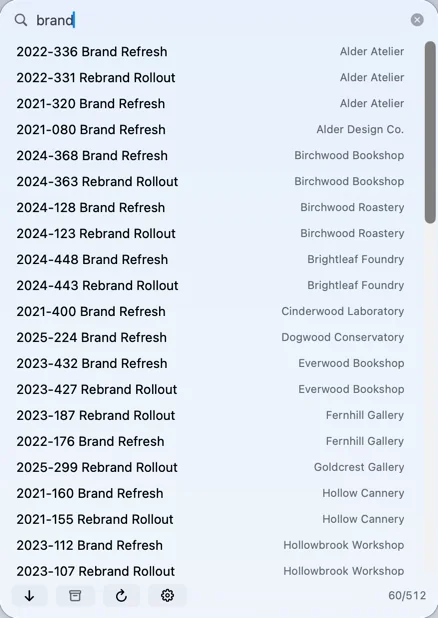
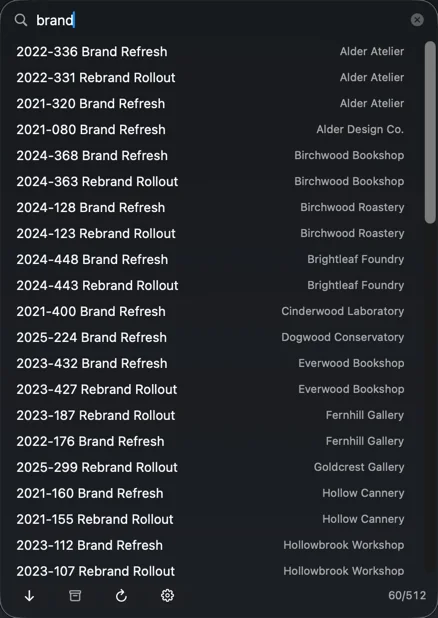
TeleFolder is a pneumatic filing cabinet for your Mac’s menu bar. Press ⌃⌥⌘ Space, type a few letters of a job number or a client, press Return: the project folder lands in Finder. Your Mac, your drives and the office server, searched as one list.
Runs onmacOS 26 or laterAccounts requirednone whatsoeverTrackerszeroFolders moved or renamednot onePrice$29.99 once, after 14 days free
“In every office, ladies and gentlemen, there is a server. On that server, a folder. In that folder, four thousand more folders. Somewhere in there is the Hendricks remodel. Nobody has seen it since Tuesday.”
The Narrator
Thank you, Narrator, that’ll do. Folks, Gus Skipworth. In 1958 I had every folder in the hangar delivered to my desk by pneumatic tube. It took four minutes and, now and then, a Skipwright. This one takes a keystroke, and nobody gets sucked into the walls.
Augustus Skipworth, interrupting
A footnote from the Narrator. The Skipwright was retrieved on the Thursday, from a sitting room inside the tubes nobody knew was there, and has asked to be transferred to Accounts. Miss Pell built the panel you are about to see. Mr. Skipworth announced it.
Reel 2 · The Demonstration
Live, in This TheatreTry It Yourself
This is TeleFolder’s search, running on a sample file server of a hundred invented jobs. Click the panel and type a job number or a name. Nothing you type leaves your browser.
Exhibit AThe Panel, in Its Natural HabitatProjection Booth 2
3287 Pinehurst Branch Senior Living Center3200-3299
3286 Ivywood Landing Aquarium Wing3200-3299
3285 Birchwood Point Library3200-3299
3287 Pinehurst Branch Senior Living Center3200-3299
3285 Birchwood Point Library3200-3299
3283 Quarry Ridge Clinic Expansion3200-3299
3282 Copperfield Springs Clinic Fit-Out3200-3299
3266 Ironwood Springs Library3200-3299
3242 Juniper Creek Senior Living Center3200-3299
3240 Granite Bluff Library3200-3299
3221 Longview Court Library3200-3299
3195 Birchwood Pass Library3100-3199
3176 Ironwood Bay Library3100-3199
3169 Elm Creek Bridge Lighting3100-3199
3150 Granite Branch Library3100-3199
3131 Longview Orchard Library3100-3199
3105 Birchwood Ridge Library3100-3199
3285 Birchwood Point Library3200-3299
3266 Ironwood Springs Library3200-3299
3240 Granite Bluff Library3200-3299
3221 Longview Court Library3200-3299
3195 Birchwood Pass Library3100-3199
3176 Ironwood Bay Library3100-3199
3150 Granite Branch Library3100-3199
3131 Longview Orchard Library3100-3199
3105 Birchwood Ridge Library3100-3199
3086 Ironwood Walk Library3000-3099
3060 Granite Landing Library3000-3099
3041 Longview Lane Library3000-3099
3015 Birchwood Terrace Library3000-3099
2996 Ironwood Heights Library2900-2999
997/1095186/109544/1095
Live demo. Click the panel and type 3150, brewery or hend, or press ⌃⌥⌘ Space.
Sample projects for illustration. Names are fictional; any resemblance to real projects, firms or places is coincidental.
Try:
Every word counts, in any order.library 32 finds the libraries in the 3200s. Arrow keys move, Return opens, Escape clears and then closes. I had a butler do this. He retired. The panel didn’t.
The Founder
“SkipWire. He’s busy. Whaddya want?”
A folder? Hon, you don’t need him for that. You type the number, you press Return, it opens. He’ll tell you he invented it on the walkway. He’s on the walkway. Since ’74.
Anyone who keeps a folder per job has played every part in it.
Overheard Verbatim
Transcript · Drafting Room
The Hendricks Remodel
a tragedy in four minutes
09:14 “Christine! What’s the job number for the Hendricks remodel?” Christine is on a call.
09:15 “Jimmy, is it under 2400–2499, or did it go to the archive? I need to change one date on one drawing.” Jimmy is at lunch. It is 9:15.
09:16 Someone opens the server, guesses 2471, and edits the wrong job.
09:16 Or: press the shortcut, type hend, press Return. 2417 Hendricks Remodel opens in Finder.
Thunk.Filed by laboratory staff. Christine, Jimmy and the Hendricks job are invented.
Reel 3 · How It Works
In Four ActsThe Network Is Out of the Keystroke Path
TeleFolder reads your folders ahead of time and keeps its own list on your Mac. Typing filters that list in memory. The file server isn’t touched until you open something.
The Annex tube, cut away. The junction lamp’s signal, written out for readers who prefer their lamps still:
Act I
Scan
Missing shares are mounted quietly with your keychain password. Then each location is read the way it’s filed.
Act II
Index
The project list lives on your Mac. A share that drops off stays listed, dimmed, as last seen.
Act III
Filter
Every keystroke narrows the in-memory list. Every word must match, in any order: hosp 24 finds 2417 Mercy Hospital.
Act IV
Open
Return opens the folder in Finder. If its share isn’t connected, it’s connected first. Thunk.
Asked by the Narrator how many times the server is touched per keystroke
0
Miss Harriet Pell, Chief Engineer. That was the whole interview.
The list refreshes on its own when it’s older than you allow (Settings › General), or on demand with Rescan ⌘R. Stress-tested with 26,000+ projects, still filtered on every keystroke.
Reel 4 · The Exhibits
Your Filing Stays PutFinding It Gets Quick
TeleFolder learns how your office files jobs, then gets out of the way. It reads your folders as they are and never moves or renames a thing.
Exhibit A-1 · Network Share Routing
Live work here. The archive on the server. One list.
Folders on this Mac, external drives and network shares are searched as one list. Shares are mounted before each scan, quietly, within your mount timeout, with the password from your keychain.
Projects on a share that isn’t connected stay searchable, dimmed
Opening one connects its share first
Failures say why in words: unreachable server, missing share, rejected password
smb://afp://nfs://https:// (WebDAV)
One row per job, even when it lives in two places.
Exhibit A-2 · Zero Telemetry
Client names and job numbers stay in the building.
TeleFolder builds its list from your folders, on your Mac, and keeps it there. No cloud, no sync service, no servers of ours. It connects only to the file servers you add yourself.
No account: no sign-up, no email, no password to forget
No analytics, tracking, ads or crash reporting
Searching needs no internet, on a plane too
Runs in the App Sandbox: it reads only folders you choose
Particulars of the DataFiled by laboratory staff
Collected
Nothing
Sent to us
Nothing. We don’t have anywhere to put it.
Kept on your Mac
Settings, saved setups and the project list. Share passwords live in your keychain.
Talks to
Your file servers. Nobody else.
Web views
Zero. It’s native Swift.
Exhibit B-1 · Global Hotkey
Five folders deep, in one keystroke.
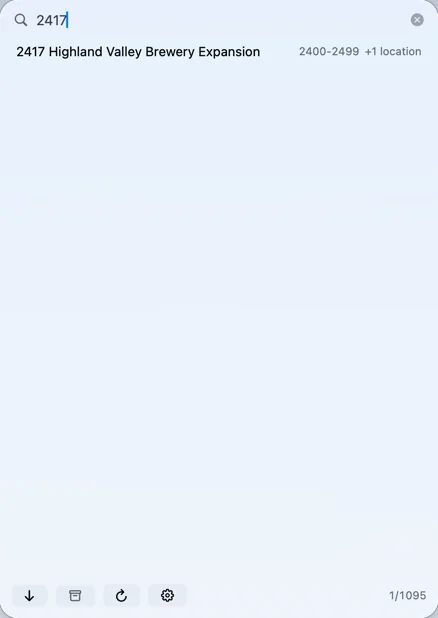
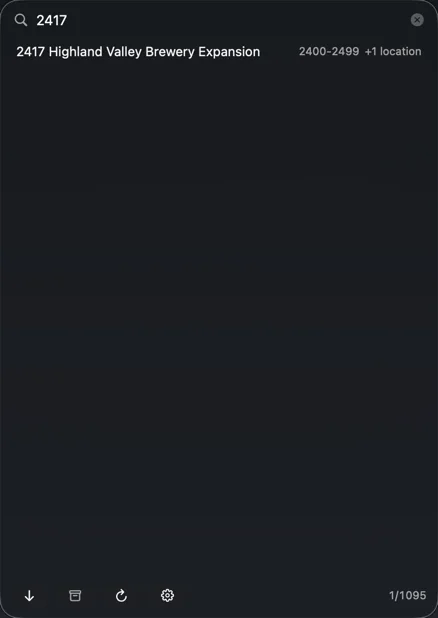
Summon the panel from any app, over any CAD, BIM or Finder window, without touching the mouse. Type 2417 or library, move with the arrow keys, press Return.
Escape clears the search, then closes the panel
Or double-click, or drag a project into Finder or an Open dialog
Copy a folder’s name or full path, or show it in the folder that holds it
⌃⌥⌘ Space⌃⌥ Pdefaults · change them in Settings
Studios that file by client see the client beside every job.
Exhibit B-2 · Any Folder Layout
Every office files a little differently.
One folder of projects, or projects grouped by number range (2400-2499), year, month or quarter, client, A–Z or any folder name, at any depth. Pick a familiar scheme from a menu, or build your own.
A folder counts as a project when its name starts with a number or a date, matches a pattern you build from menus, or holds a marker such as .git
Phases and other sub-projects inside a job are listed too, grouped under it
Finder aliases are followed; NAS snapshot and recycle folders are ignored
By number range
Projects
2300-2399
2400-2499
2417 Highland Valley Brewery
2401 …
By year
Archive
2023
2024
2024-128 Brand Refresh
2024-083 Seasonal Campaign
By client
Clients
Alder Atelier
2025-334 Product Launch Kit
2024-328 Logo Suite
Birchwood Roastery
listed as a project. Every name is invented.
Exhibit C-1 · Archives, Handled
Finished jobs, out of the way.
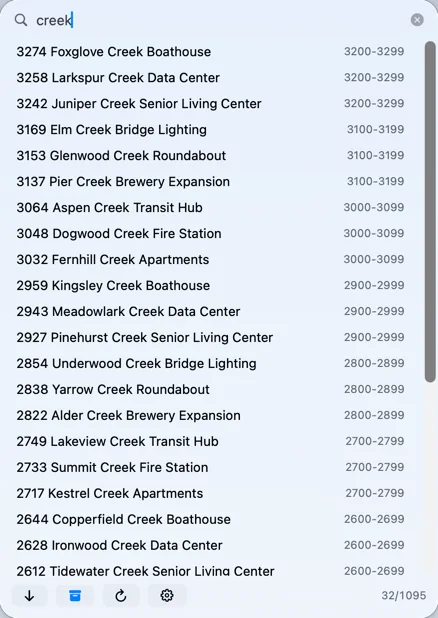
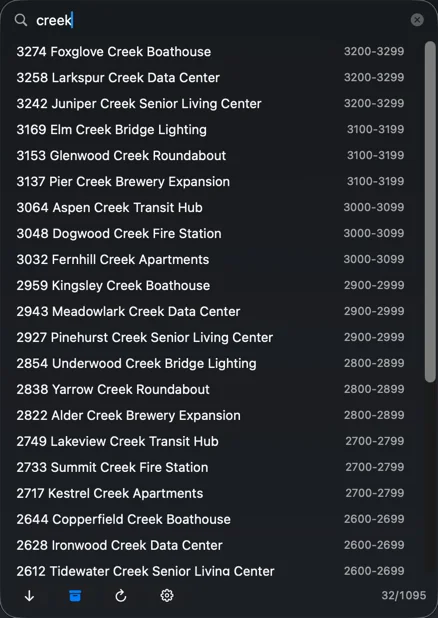
An archive location, archive subfolders such as _Archive, or status folders: “Closed” archived, “On Hold” listed last, “Declined” hidden. Jobs packed into zip, 7z, RAR, tar, StuffIt or a disk image can be listed as archived projects.
Archived jobs stay hidden until you click the archive button, then mix in or group below.
Even the ones packed into a zip.
Clear cone in use. An invisible invention is somewhere in this exhibit hall. Please don’t step on it. Nobody knows where it is. Under the clear cone: sealed canister PA-1985, misfiled by Solitary Lake Partners as a non-core asset.
Exhibit D-1 · The Setup Wizard
Set up in under a minute.
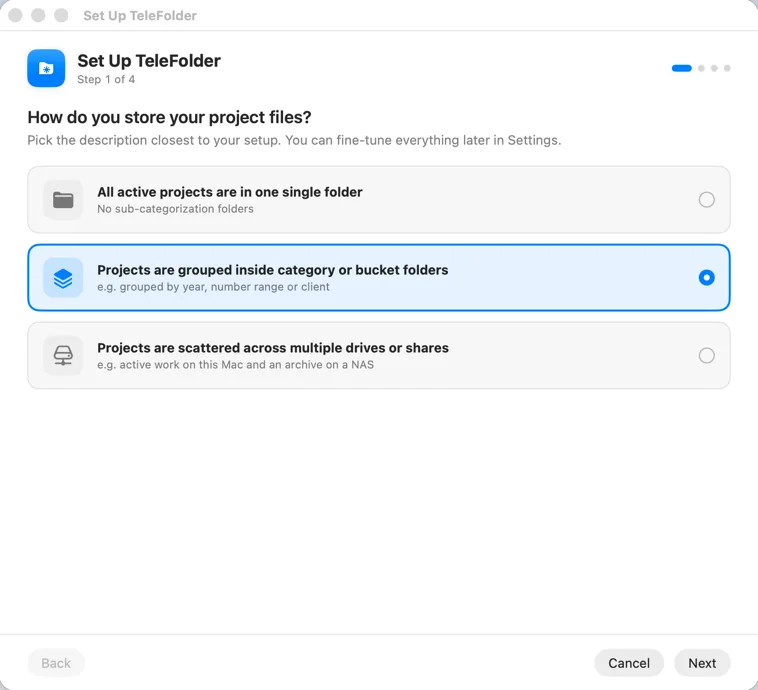
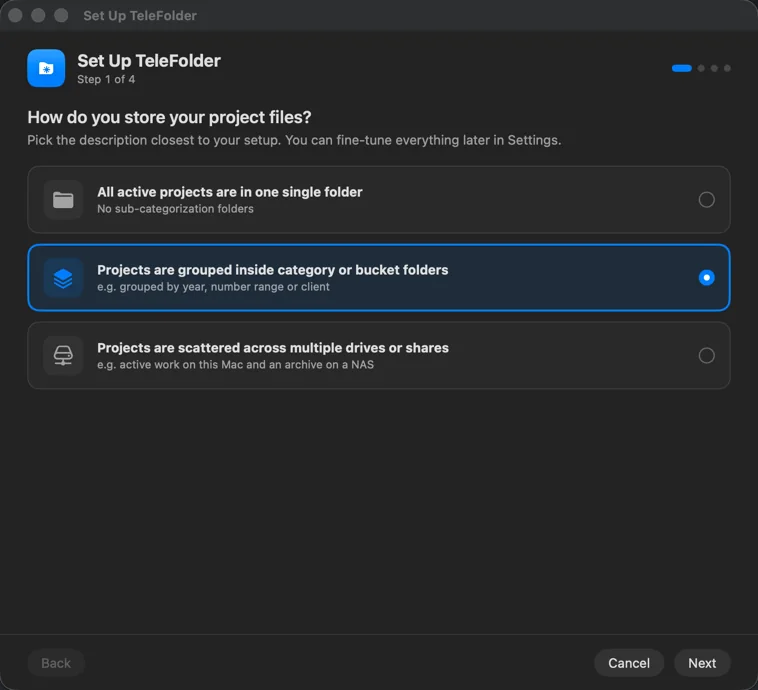
Four short steps. It asks how your projects are stored, has you choose the folders, and previews what it finds before you commit, with one-click fixes when the result looks wrong.
Then make it yours: your own name for the app, and its menu bar icon as its own glyph, any SF Symbol, your own image, or a monogram.
Step one of four.
Reel 5 · Engraved in Brass
Over the Annex DoorWhat the Tube Will Not Do
Refusal No. 1
No moving
Your folders stay exactly where they are. TeleFolder reads them; it doesn’t rearrange them.
Your filing, your rules.Refusal No. 2
No renaming
Names on disk stay as they are. Two locations, one job? It merges the row, not the folders.
Hands off the label maker.Refusal No. 3
No accounts
No sign-up, no password, no email. You open the app and use it.
We don’t want your email.Refusal No. 4
No rent
Fourteen days free, then paid for once. No subscription, nothing to cancel.
Bought, like a filing cabinet.
SituationShouting across the officeSpotlight & Finder searchTeleFolder
Projects on the office serverChristine knows. Christine is on a call.Many servers and NAS boxes aren’t indexed, so searches come back slow, partial or empty.Reads the server’s folders itself, so every job on every share is searchable.
What you get backA job number, eventually, possibly correct.Every email, PDF and sheet that shares four letters with the job. Rarely the folder.One row per job: the project folder. Return opens it.
Off the VPNShout louder.A share that isn’t connected isn’t searched at all.Projects stay listed, marked “not connected.”
Old jobs in a zip“Ask Jimmy.”Just another file.Listed as an archived project.
Reel 6 · The Ledger
Simple, HonestBuy It Once. Keep It.
No subscription, no renewals, no account to create. Try every feature free for two weeks, then decide.
Form T-1 · The Trial
Fourteen Days
$0
every feature on, no card asked for
Set it up on your real folders
Your settings stay put when it ends
Restore Purchase lives in the same window
Form T-2 · The Deed
TeleFolder
$29.99
once, for life, with every future update
No subscription, no renewals
No account, no ads, collects no data
Yours on every Mac signed in to your Apple Account
Bought through the Mac App Store
ApprovedForm SLP-85 · Proposed by Solitary Lake Partners
TeleFolder Enterprise Cloud Platinum+
Per seat, per month$14.99
Folder Insights™ dashboardadd-on
Search, per keystrokemetered
Your foldersin our cloud
Support, by Gary™ the support botper click
Rejected by Mr. Skipworth in 1985, from a chair he refused to vacate. “The chair is the company.”
He won’t say the number out loud. He thinks prices are rude. So: $29.99, once, after two weeks free. No renewals, nothing to cancel, and nobody named Gary.
Dottie, who says the number
Does it pay for itself?
Rough math, from the hour a week the person who made this app used to lose hunting for folders. An estimate, not a promise: that’s what the trial is for.
If your time is worth
it pays for itself in
$30 an hour
about a week
$60 an hour
about 2½ working days
$100 an hour
about 1½ working days
$150 an hour
less than a day
Inter-office memorandum
For Studios & Offices
set it up once, share it with everyone
One person sets TeleFolder up for the office’s drives and shares, then chooses Configurations › Save to File. Everyone else picks Load from File and is searching the same projects in a minute. Any folder that sits somewhere else on their Mac is relinked in one step.
Each person tries it free for 14 days, and buys it once for their own Apple Account.
Reel 7 · The Pneumatic Annex
An Unsolved MatterThe Case of the Misrouted Canisters
A puzzle you solve with the product. No sign-up, no prizes worth money, and your progress stays in this browser.
Unsolved Since 9:04
From the desk of
The Narrator
to the audience, confidentially
At 9:04 a.m. on the morning Solitary Lake Partners walked Mr. Skipworth out of the building, Miss Dottie Ferraro put six canisters into the pneumatic tubes.
They held one page of Miss Harriet Pell’s Ledger: the leather book that records who actually built every invention in the hangar. The page was TeleFolder’s. Miss Ferraro said she was keeping it out of the wrong hands. That afternoon the consultants “rationalized” the Annex, and the canisters never came out.
Miss Pell has not asked for the page back. Miss Pell would not. Miss Ferraro has asked the Narrator to ask you.
Canisters are recovered the way everything here is found: type the code into the demonstration in Reel 2 and press Return. The first one is on the house: PA-1958
The other five are somewhere on this page, or near it. Some are printed. Some are not meant for the audience. One is under a cone nobody can see. One only arrives when you aren’t looking.
The NarratorReading the Skipwrights’ hints below is not cheating. It is, however, noted.
The Tube Manifest
Clearance: Visitor · 0 of 6 recovered
The Annex Door · Combination Lock
Six wheels. One word.
Each canister lid is stamped with one letter and the wheel it belongs on. Dottie set the combination. Harriet wouldn’t have.
Hints FromThe Skipwrights
ReceivedThe Ledger Page, and the Drawing
The Ledger · Item: TeleFolder · kept by H. Pell
Annex Clearance Certificate · issued by the Central Switchboard
Keeper of the Annex
Miss Ferraro has stamped the page RECEIVED and corrected the credits at the top of Reel 1. Asked for comment, Miss Pell said: “1.”
Received
Splendid work, Pell. I’ll tell everyone I did it. Folks, the Ledger is a fine book. I have never read it. I have never needed to.
Augustus Skipworth, who has since told everyone
Reel 8 · Questions From the Audience
You in the BackQuestions, Answered Briefly
Is it a subscription?
No. After the 14-day free trial, TeleFolder is a single $29.99 purchase through the Mac App Store, yours for life with every future update. No renewals, nothing to cancel.
What happens when the trial ends?
TeleFolder asks you to unlock it. Your folders and settings stay exactly as they were, and everything works again the moment it’s unlocked. Restore Purchase is in the same window and in the menu.
Which Macs does it run on?
Macs running macOS 26 or later. It’s available only on the Mac App Store.
We have several people. How do we roll it out?
Set it up on one Mac, choose Configurations › Save to File, and send the file round. Everyone else chooses Load from File. Each person buys it once for their own Apple Account after their trial.
A location says “Needs access”
macOS only lets the app read folders you have chosen. Click Grant… and choose the folder.
A network share isn’t found
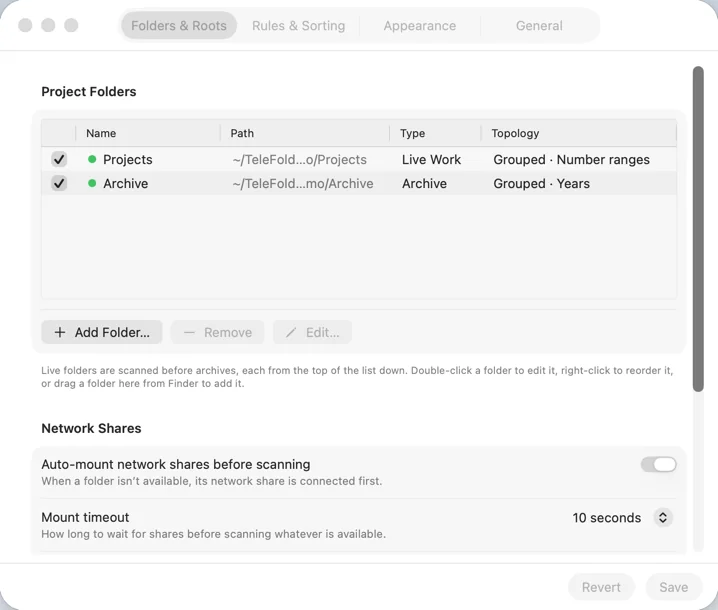
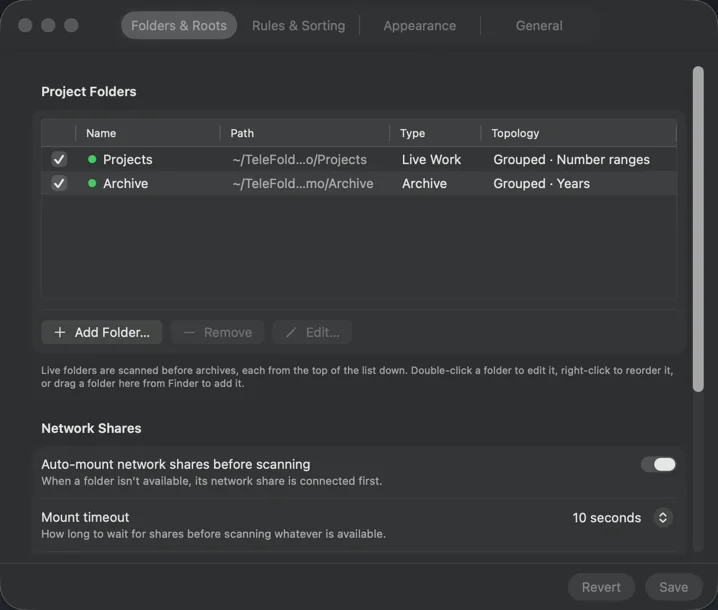
Open Settings › Folders & Roots, select the location and enter the share address (for example smb://server/Projects). Saved passwords are kept in your keychain.
The wrong folders are listed as projects
Run the Setup Wizard again, or change the naming rule and ignore list under Rules & Sorting.
A client folder with several jobs should be a group
Open the folder’s editor (Settings › Folders & Roots › Edit…) and turn on “A folder that contains projects is a group”.
A job has phases that should be listed too
Turn on “List sub-projects inside projects” in the folder’s editor; a sub-project pattern lets you match names of your own.
Can it find projects by what’s inside them?
Yes. A folder can count as a project when it holds a marker, such as a .git folder. Choose “Contains a marker” as the naming rule under Rules & Sorting.
Can zipped or imaged jobs be listed?
Turn on “List archive files as archived projects” in the folder’s editor. Zip, 7z, RAR, tar, StuffIt archives and disk images named like a project are listed as archived.
How do I set a keyboard shortcut?
Settings › General › Global shortcut. The defaults are ⌃⌥⌘ Space and ⌃⌥ P.
Is Augustus Skipworth a real person?
He would prefer you didn’t ask. The software is real, and so are the refusals.
Getting started. After launch, TeleFolder lives in the menu bar. Click its icon, or press ⌃⌥⌘ Space, to search; right-click it for Preferences, Rescan and the Setup Wizard. The wizard asks how your projects are stored and shows a preview of what it finds.
TeleFolder Privacy Policy
Effective November 2026
TeleFolder is a Mac menu bar app for finding and opening project folders. It collects no data.
What the app does not do
TeleFolder collects no data from anyone. It has no accounts, analytics, advertising, tracking or crash reporting. It sends nothing to the developer or to anyone else.
What stays on your Mac
Your settings, saved configurations and the list of projects it found are kept in the app’s own folder on your Mac. Permission to read the folders you choose is kept in the app’s preferences. Passwords for network shares are kept in your macOS keychain.
Network connections
The app connects only to file servers you add yourself, to mount the shares that hold your projects. Those connections go to your server, never to the developer.
This website
This site uses no cookies, analytics or trackers, and loads nothing from other sites: its fonts are served from here. Its scripts never contact anyone. Your browser’s local storage remembers two things on your own device: light or dark, and your progress in the Annex. Clear them by clearing this site’s data.
Changes and contact
If this policy changes, the new version will be posted on this page. Questions: support@telefolder.com.
Your Filing Stays Put.Finding It Gets Quick.
Try it free for 14 days. Then $29.99 once, for life, with every future update. No subscription.